CRT Bloom: Old-Screen Glow on Low-Poly Night Scenes
CRT bloom is the glow that spills out of bright spots on an old tube screen. Street lights, monitor light and white text spread into the dark around them, and faint scanlines run across everything. It is what makes a low-poly night scene feel like it is playing on a TV from 2003. Below is a side-by-side on real demo stills, the editing recipe and a generator for the base picture.
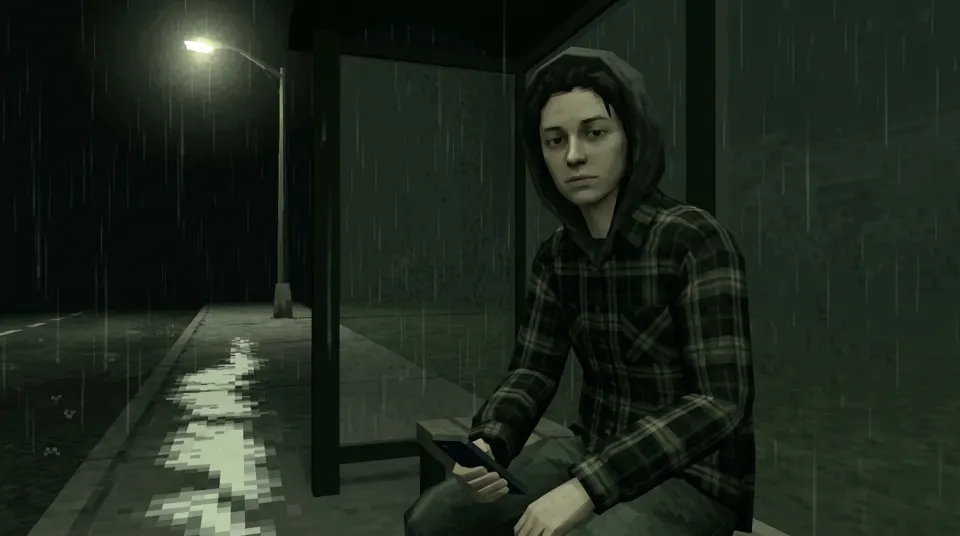
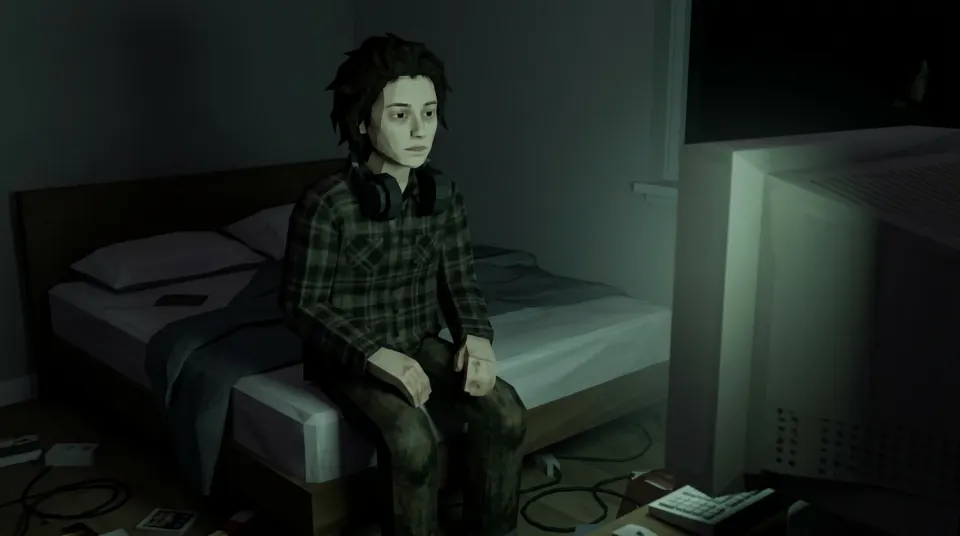
CRT bloom before and after
Left: the unedited demo still. Right: the same still with a CSS bloom, scanlines and a dark edge, rendered live in your browser. The generator does not apply this effect; it shows what the recipe below does. The input selfie is AI-generated and shows a fictional person, not a customer or a real individual.
How to add CRT bloom
- Duplicate the picture. Blur the top copy strongly (Gaussian blur around 1–2% of the width) and raise its brightness.
- Set the blurred copy to Screen or Add and lower its opacity until the lights glow but faces stay readable.
- Add a scanline overlay: thin dark horizontal lines every two or three pixels at low opacity.
- Finish with a soft dark vignette and, for video, a very slight flicker. Video mode gives a 6-second MP4 to treat the same way.
CapCut, Photoshop, GIMP and most phone editors have all four steps. For ready-made versions made by other creators, see the CapCut PS2 templates.
Generate the night scene first
The generator opens on the rainy bus stop, the scene with the strongest single light. Upload a selfie you have permission to use and download a landscape 16:9 PNG at 1K. An eligible verified account may get one free watermarked still when the trial is enabled and daily capacity remains.
Style: PS2
1. Your photo
One clear photo of a face. JPG, PNG or WebP, up to 10MB.
Sign in to upload a photo. Your first still is free (watermarked); more stills and videos use credits.
Free first still
Sign in to make one free watermarked still. Video costs 10 credits.
One free still in total, whichever style or page you use.
Pricing, free-still rules and AI models
Before you generate
- Sign-in is required to upload a photo and generate.
- Free first still: after you sign in, you can make one free still with a losercoreai.com watermark, limited to one per account and one per device. Video is never part of the free still, and a daily cap may apply.
- Paid: a still costs 2 credits. A video costs 10 credits and includes the still.
- A paid generation that fails refunds its credits.
AI models
Images are AI-generated with Nano-Banana-2 through HiAPI.
Supported video models through HiAPI: Kling 2.5 Turbo, Hailuo 2.3 Fast, PixVerse v6 and Seedance 2.0 Mini. The model used depends on service settings and availability.
This is an independent service, with no official affiliation with or endorsement by these model providers.
Result
Related looks
- The base character look: PS2 filter online.
- The bedroom that CRT sits in: older brother core.
- Rougher and older than bloom: the PS1 filter for photos.
- Make it move first, then add bloom: photo to PS2 video.
CRT bloom FAQ
- What is CRT bloom?
- CRT bloom is the soft glow that bleeds out of bright areas on an old tube screen: lights, white text and highlights spread into the dark around them, often with faint scanlines. Later games also faked a similar glow on purpose as a lighting effect.
- Does the generator add CRT bloom to my photo?
- Not as a setting. The still is a clean PNG at 1K with the scene’s own light. The bloom preview on this page is a CSS effect running in your browser to show the difference; you add the glow yourself in an editor.
- How do I add CRT bloom to a picture?
- Duplicate the image, blur the copy strongly, raise its brightness and blend it over the original with Screen or Add at a low opacity. Then lay a thin horizontal-line overlay on top for scanlines. CapCut, Photoshop, GIMP and most mobile editors can do this.
- Which scene gets the best bloom?
- Night scenes with one bright light. The rainy bus stop opens by default here: Sitting at a rainy night bus stop under a flickering street light, hood up. The 3 a.m. bedroom with its monitor glow also works well.
- Is CRT bloom the same as a VHS filter?
- No. VHS filters add tape noise, colour bleeding and tracking lines. CRT bloom is only the screen glow and scanlines, so it looks cleaner and works on stills as well as video.
- Is the CRT bloom picture generator free?
- After you sign in, your first still is free with a losercoreai.com watermark: one per account and device, and a daily cap may apply. Otherwise a still costs 2 credits and a video costs 10 credits. Video is never part of the free trial.
See credit packs and pricing before choosing a paid option.