Vectorheart: Angular Y2K Vector Style for Game Menus and HUDs
Vectorheart is a Y2K graphic style from the late 1990s to the mid-2000s: flat vector shapes, sharp 45 and 60 degree diagonal cuts, arrows and speed lines, futuristic type that jumps between very heavy and very light weights, technical labels, numbers, warning rules and industrial symbols. Colour is flat and high contrast, often near-monochrome with one red, yellow or cyan accent. It grew out of Swiss modernism and utilitarian industrial design, was pioneered by studios such as The Designers Republic and Bionic Systems, and you saw it in the menus of Wipeout, Ridge Racer Type 4 and Ace Combat 3, including their character select screens. It is flatter than Metalheart's 3D chrome, and it is not soft or rounded. Below are two sample cards, the design rules and how to drop your own low-poly portrait into one.
Vectorheart character card samples
The portrait is a crop of a real demo still. The cut panel, warning stripe, arrows, labels and bars are HTML, CSS and inline SVG on this page. The generator never draws menus, text, icons or interface panels. The stats are made-up jokes. The input selfie is AI-generated and shows a fictional person, not a customer or a real individual.
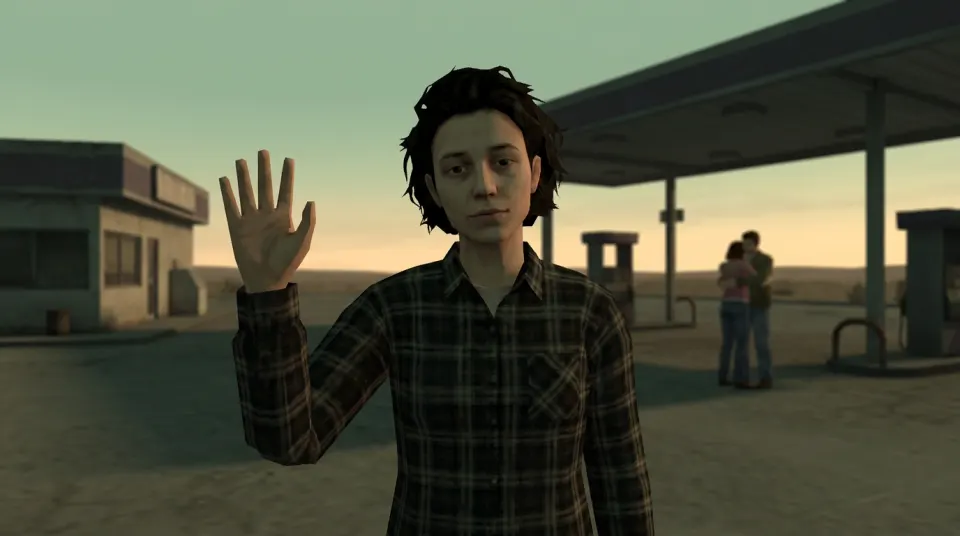
Sunset Waver
▲ Caution · Unit 01-GS
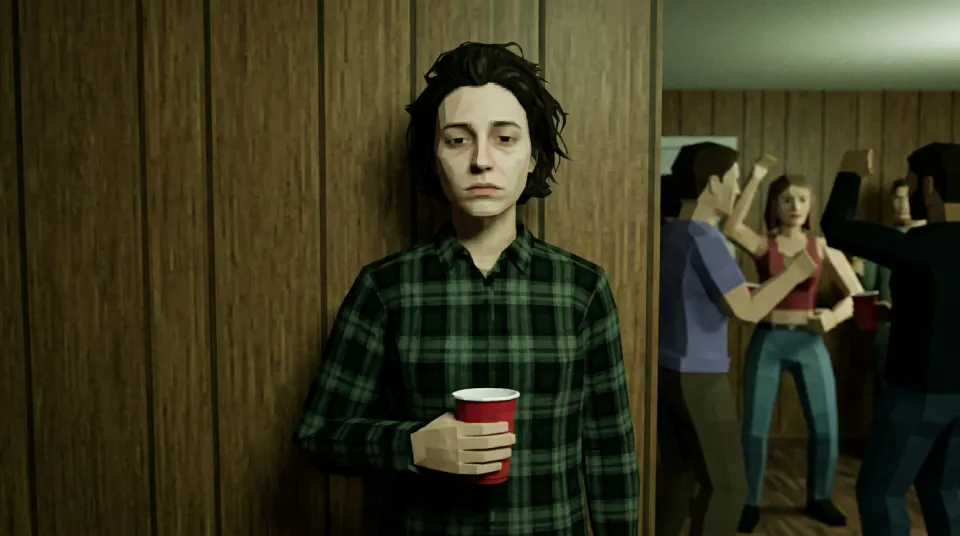
Wall Guardian
▲ Caution · Unit 02-HP
Vectorheart design rules
- Shapes: flat vector panels with sharp 45 or 60 degree diagonal cuts, arrows, chevrons and speed lines. No rounded corners, no gradients, no 3D chrome.
- Colour: flat, high contrast, often black, white and grey with one red, yellow or cyan accent.
- Layout: a grid in the Swiss modernist tradition, with technical labels, unit numbers, thin rules and warning stripes. On a character select screen that means a cut-corner portrait, a name and two or three segmented stat bars.
- Type: futuristic sans-serif with extreme contrast between very heavy names and very light labels, plus small monospaced caps for codes and numbers. Industrial symbols such as warning triangles fit in.
Vectorheart vs low poly: two layers of the same screen
A low poly look changes the character into blocky early-console 3D; that is what the low poly filter does. Vectorheart is the flat graphic layer around that character. On a late-1990s racer or flight game select screen you saw both at once: a low-poly model in the middle, sharp vector panels, arrows and labels around it. This page covers the vector layer; the generator gives you the 3D-looking portrait.
- Generate a still of yourself below.
- Crop it to a square or circle. The losercore pfp page crops a completed paid still into a square.
- Build the card in Figma, Canva, Illustrator or Inkscape with the rules above. Only that frame is vector; the portrait stays a PNG.
Portrait generator for your card
Sign in, upload a selfie you have permission to use and download a landscape 16:9 PNG at 1K. An eligible verified account may get one free watermarked still when the trial is enabled and daily capacity remains.
Style: PS2
1. Your photo
One clear photo of a face. JPG, PNG or WebP, up to 10MB.
Sign in to upload a photo. Your first still is free (watermarked); more stills and videos use credits.
Free first still
Sign in to make one free watermarked still. Video costs 10 credits.
One free still in total, whichever style or page you use.
Pricing, free-still rules and AI models
Before you generate
- Sign-in is required to upload a photo and generate.
- Free first still: after you sign in, you can make one free still with a losercoreai.com watermark, limited to one per account and one per device. Video is never part of the free still, and a daily cap may apply.
- Paid: a still costs 2 credits. A video costs 10 credits and includes the still.
- A paid generation that fails refunds its credits.
AI models
Images are AI-generated with Nano-Banana-2 through HiAPI.
Supported video models through HiAPI: Kling 2.5 Turbo, Hailuo 2.3 Fast, PixVerse v6 and Seedance 2.0 Mini. The model used depends on service settings and availability.
This is an independent service, with no official affiliation with or endorsement by these model providers.
Result
Related pages
- The screen behind the cards: PS2 menu aesthetic.
- Compare every scene before you pick a portrait: PS2 character generator.
- Filter-style walkthrough: PS2 filter online.
Vectorheart FAQ
- What is Vectorheart?
- Vectorheart is a loose label for a Y2K graphic style from the late 1990s to the mid-2000s: flat vector shapes, sharp 45 and 60 degree diagonal cuts, arrows and speed lines, futuristic type with very heavy and very light weights, technical labels, numbers, warning rules and industrial symbols, in flat high-contrast or near-monochrome colour with one red, yellow or cyan accent. It draws on Swiss modernism and utilitarian industrial design, is associated with The Designers Republic and Bionic Systems, and shows up in the menus of Wipeout, Ridge Racer Type 4 and Ace Combat 3. It is flatter than the 3D chrome of Metalheart and is not soft or rounded.
- How is Vectorheart different from a low poly filter?
- A low poly filter changes the character into blocky 3D. Vectorheart is the flat graphic layer around a character: the cut panels, arrows, labels and stat bars. On this page the low-poly still is the portrait and the angular vector card is drawn in HTML and CSS around it.
- Can the generator make Vectorheart art?
- Not directly. The generator never draws menus, text, icons or interface panels, and it does not output vector files. It gives you a low-poly portrait (a 16:9 PNG at 1K) to place inside a vector card you build in Figma, Canva, Illustrator or Inkscape.
- How do I make a Vectorheart profile card?
- Crop your still to a square, cut one corner at 45 degrees and place it on a dark flat panel with cut corners. Add a very heavy name, light monospaced labels and unit numbers, thin rules, a warning stripe, an arrow or speed lines and two or three segmented stat bars. Pick one accent colour such as red, yellow or cyan and keep everything else black, white and grey.
- Do I get an SVG or a vector file?
- No. The download is a raster PNG. Only the frame you design yourself can be vector.
- Is the Vectorheart portrait generator free?
- After you sign in, your first still is free with a losercoreai.com watermark: one per account and device, and a daily cap may apply. Otherwise a still costs 2 credits and a video costs 10 credits. Video is never part of the free trial.
See credit packs and pricing before choosing a paid option.