Losercore PFP Generator
A losercore pfp is a PS2 / low-poly profile picture made from a selfie you have permission to use. Generate a lonely scene, then crop a completed paid still into a square PNG for Discord, Steam and similar avatars. The result is a flat image, not a 3D mesh. A paid still costs 2 credits; the local square crop adds no credits. Trial stills cannot use the dedicated square exporter, and video results cannot be cropped. Upload the square PNG as a Twitch, Reddit or Xbox avatar too, subject to each platform’s upload rules.
Style: PS2
1. Your photo
One clear photo of a face. JPG, PNG or WebP, up to 10MB.
Sign in to upload a photo. Your first still is free (watermarked); more stills and videos use credits.
Free first still
Sign in to make one free watermarked still. Video costs 10 credits.
One free still in total, whichever style or page you use.
Pricing, free-still rules and AI models
Before you generate
- Sign-in is required to upload a photo and generate.
- Free first still: after you sign in, you can make one free still with a losercoreai.com watermark, limited to one per account and one per device. Video is never part of the free still, and a daily cap may apply.
- Paid: a still costs 2 credits. A video costs 10 credits and includes the still.
- A paid generation that fails refunds its credits.
AI models
Images are AI-generated with Nano-Banana-2 through HiAPI.
Supported video models through HiAPI: Kling 2.5 Turbo, Hailuo 2.3 Fast, PixVerse v6 and Seedance 2.0 Mini. The model used depends on service settings and availability.
This is an independent service, with no official affiliation with or endorsement by these model providers.
Result
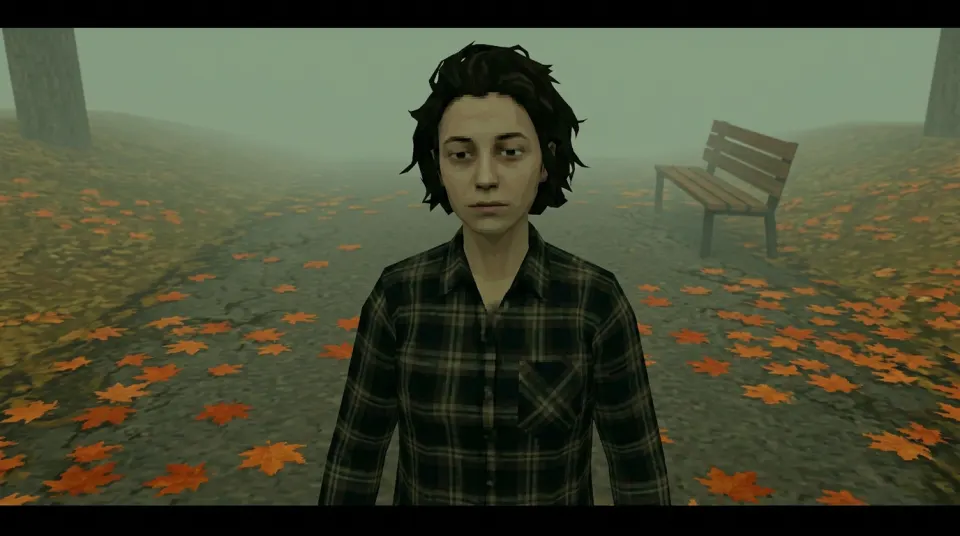
Losercore PFP example clip
Original AI-generated example clip for illustration, not output of our generator; no real people.
How to make a losercore pfp for Discord or Steam
These display examples use a compressed WebP of an AI-generated fictional person, not a customer photo. Leave headroom above the face and space beside the ears when choosing your square. A circular profile display can hide hair, shoulders and objects near the corners; check both previews before downloading your square PNG.
- Use a clear face photo that you have permission to upload. Leave room around the face for a square crop.
- Choose one of the existing scenes and keep Image selected. A paid still costs 2 credits. Review the result and its likeness.
- For a successful paid still, use the square-export controls below the result. Drag or use the labelled position and zoom controls, then download the PNG.
- Upload that square PNG as your Discord, Steam or other profile picture. Check the app's own preview, since display frames vary. A circular crop hides the corners; the exported file itself stays square, without an added circular mask.
The generator requests a landscape 16:9, 1K PNG; returned pixel dimensions can vary. Square export selects source pixels at their native resolution and never upscales. Zooming in makes a smaller native-pixel download. The circle preview shows how a profile crop may appear; the exported PNG stays square, without an added circular mask or transparent cutout.
Cropping happens locally in your browser and makes no new AI request or credit charge. Your original download stays available if private image loading, decoding or export fails. This creates a flat profile image, not a 3D character or game-ready model.
Choose the setting for your scene
Start with the mood you want. Each preset places your selfie in a different low-poly setting. The image and video options use these same five scenes, and the setting is what changes between them.
- Foggy park
- Autumn leaves, an empty bench, a long sigh.
- Standing on a foggy autumn path beside an empty bench, with orange leaves.
- Gas station sunset
- An awkward wave while a couple hugs behind you.
- An awkward wave at an empty sunset gas station, with a distant couple hugging.
- 3 a.m. bedroom
- Monitor glow, headphones on, nobody texting back.
- Sitting alone on a bed at night, lit by a monitor, with headphones.
- House party wall
- Red cup, everyone dancing, you holding up the wall.
- Standing against the wall at a house party with a red cup while others dance.
- Rainy bus stop
- Hood up, flickering street light, the bus isn't coming.
- Sitting at a rainy night bus stop under a flickering street light, hood up.
Paid square export and free stills
After you sign in, your first still is free with a watermark (one per account and device; a daily cap may apply). Trial results keep their original watermarked download; dedicated square export requires a paid still. Video results cannot use the avatar crop exporter. Switching to Video keeps the existing 10-credit video option.
Check credit packs and pricing, explore the PS2 prompt recipes, or use the video generator for an animated scene.
Need the wider scene for your screen? Use the desktop wallpaper generator and fitting guide. To animate your photo, read the Losercore video tutorial before starting a separate video job.
Losercore pfp FAQ
Prefer a softer or stranger background? Try the Dreamcore image generator for pastel nostalgia, or the Weirdcore image generator for uncanny digital scenes. Both make flat stills from your permitted photo. Paid stills support local crops; buying credits does not change an old trial watermark.
- Can I make a low-poly Y2K / PS2-style avatar (avatar maker)?
- Yes. Start with one permitted selfie, generate a paid still, then export a square crop for Discord, Steam, Twitch, Reddit or Xbox, subject to each platform’s upload rules. This avatar maker produces a flat PNG with a low-poly Y2K / PS2-style look, not a 3D or rigged avatar.
- Can I make a losercore banner for Discord, X or YouTube?
- A completed paid still is a 16:9 PNG you can crop to a banner yourself. Each platform’s banner size and safe area are not guaranteed. The output is a flat PNG, not an animated banner.
- Can I make a losercore playlist pfp?
- You can make a square PS2-style pfp from your own permitted selfie in the same lonely cutscene vibe as the playlist meme — not an official playlist logo or Spotify asset. Paid stills can use the square export; trial stills cannot. Flat PNG for Discord/Steam/Twitch/Reddit/Xbox, not a 3D avatar.
What is a losercore pfp?
A losercore pfp is a PS2 / low-poly profile picture created from a permitted selfie. It uses the same lonely early-2000s cutscene look as other stills on this site, then crops to a square PNG suited to Discord, Steam and similar avatar slots.
How do I use it on Discord or Steam?
Generate a paid still, export the native-pixel square PNG with the on-page crop controls, then upload that file in Discord or Steam profile settings. Those apps may show a circular preview; the file you upload remains a flat square PNG.
Will it stay readable as a small Twitch or Discord icon?
The square crop helps Discord, Twitch and similar small avatar slots, and a still PNG can also work as a simple stream-intro image. Keep the face centered with headroom; circular platform masks may hide corners. This is a flat still, not an animated overlay or Wallpaper Engine package.
Is this a 3D avatar or anime character?
No. Output is a flat PNG still with a low-poly PS2-style look, not anime art, not a 3D mesh and not a PlayStation 2 emulator export. For a full landscape scene instead of a square crop, use the PS2 character generator.